
MongoDB JSON 데이터 import 및 기본 쿼리 - pymongo
들어가며
pymongo는 MongoDB 데이터베이스를 다룰 수 있는 파이썬 패키지입니다. 이 글에서는 파이썬과 pymongo 라이브러리를 활용하여 MongoDB 데이터베이스에 JSON 데이터를 import하고, 다양한 쿼리를 활용하여 데이터를 조회하는 방법을 소개합니다.
JSON 데이터 import
JSON 데이터를 MongoDB에 import하는 방법은 다음과 같습니다. 먼저, MongoDB 와 JSON 데이터를 위한 패키지를 다운로드 및 import합니다.
# pip install pymongo
from pymongo import MongoClient

import jsonMongoClient를 통해 로컬 MongoDB 서버에 연결 후, 특정 데이터베이스와 컬렉션을 선택합니다. 현재 테스트를 위한 MongoDB 구조는 다음 이미지와 같습니다.
# MongoDB 서버에 연결 (로컬호스트, 기본 포트 27017)
client = MongoClient("mongodb://localhost:27017")

# "dining_hub_db" 데이터베이스 선택
db = client["dining_hub_db"]

# "restaurants" 컬렉션 선택
collection = db["restaurants"]
JSON 데이터를 읽은 후, insert_many 메서드를 활용하여 MongoDB 컬렉션에 데이터를 import합니다. 에러 없이 실행됐다면 import 성공입니다.
# JSON 파일
with open("restaurant.json", "r", encoding="utf-8") as f:
    df = json.load(f)

# MongoDB 컬렉션에 삽입
collection.insert_many(df)
파이썬을 활용한 MongoDB 데이터 조회
JSON 데이터 import를 성공하셨다면, 다음은 파이썬을 활용하여 쿼리를 작성하고 데이터를 조회하는 방법을 소개합니다.
위와 동일하게 MongoDB 서버 연결 후 특정 데이터베이스와 컬렉션을 선택합니다.
from pymongo import MongoClient

# MongoDB 서버에 연결
client = MongoClient("mongodb://localhost:27017")

# "dining_hub_db" 데이터베이스 선택
db = client["dining_hub_db"]

# "restaurants" 컬렉션 선택
collection = db["restaurants"]
전체 데이터 조회
컬렉션에 저장된 모든 document를 조회는 find 메서드를 활용합니다.
all_restaurants = collection.find()
for restaurant in all_restaurants:
    print(restaurant)
데이터 개수 제한 조회
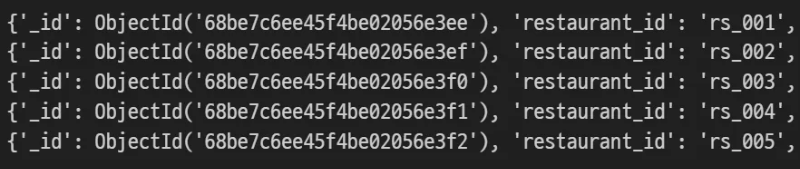
find와 limit을 사용하여 데이터 개수를 제한하여 조회할 수 있습니다. document의 개수를 제한하여 메모리 사용량을 효율적으로 관리할 수 있습니다. 5개의 document를 조회하는 방법은 다음과 같습니다.
restaurants_5 = collection.find().limit(5)
for restaurant in restaurants_5:
    print(restaurant)
데이터 정렬 조회
특정 필드를 기준으로 데이터를 정렬하여 조회할 때는 sort를 활용합니다. sort() 메서드에서 1은 오름차순, -1은 내림차순을 의미합니다. restaurant_name을 기준으로 오름차순하는 방법은 다음과 같습니다.
sorted_restaurants = collection.find().sort("restaurant_name", 1) # 오름차순:1, 내림차순:-1
for restaurant in sorted_restaurants:
    print(restaurant)
단일 조건 데이터 조회
특정 단일 조건에 해당하는 데이터를 조회할 때는 딕셔너리 형태로 조건을 지정합니다. cuisine_type이 한식인 데이터를 조회하는 방법은 다음과 같습니다.
korean_restaurant = collection.find({"cuisine_type": "한식"})
for restaurant in korean_restaurant:
    print(restaurant)
복합 조건 데이터 조회
여러 조건에 해당하는 데이터를 조회할 때는 딕셔너리 형태로 조건을 추가합니다. cuisine_type이 한식이고, ratings 배열의 average_rating이 4.6 이상인 데이터를 조회하는 방법은 다음과 같습니다.
query = {
    "cuisine_type": "한식",
    "ratings.average_rating": {"$gte": 4.6}  # gte: greater than or equal
}

filtered_restaurants = collection.find(query)
print(list(filtered_restaurants))
단일 데이터 조회
특정 조건에 해당하는 첫 번째 document만 조회할 때는 find_one 메서드를 사용합니다. cuisine_type이 한식인 데이터를 1개만 조회하는 방법은 다음과 같습니다.
one_restaurant = collection.find_one({"cuisine_type": "한식"})
print(one_restaurant)
단일 데이터를 정렬하여 조회할 때는 sort 옵션을 추가합니다. cuisine_type이 한식이고 restaurant_id 기준으로 내림차순한 데이터를 1개만 조회하는 방법은 다음과 같습니다.
one_restaurant_desc = collection.find_one(
    {"cuisine_type": "한식"},
    sort=[("restaurant_id", -1)]  # restaurant_id 기준 내림차순
)
print(one_restaurant_desc)
정규표현식을 활용한 데이터 조회
특정 문자열이 포함된 데이터를 조회할 때는 $regex를 사용합니다. restaurant_name에 '버거'가 포함된 데이터를 조회하는 방법은 다음과 같습니다.
burger = collection.find({"restaurant_name": {"$regex": "버거"}})
print(list(burger))
'Python' 카테고리의 다른 글
| [파이썬] 특정 키워드 네이버 뉴스 제목 크롤링 - BeautifulSoup (15) | 2025.10.19 |
|---|---|
| [파이썬] 데이터프레임 행, 열 선택 - iloc, loc (8) | 2025.10.04 |
| [파이썬] bokeh를 활용한 인터랙티브 시각화 기초 - 꺾은선, 산점도, 막대 그래프 (0) | 2025.07.16 |
| [파이썬] 특정 조건에 해당하는 컬럼 선택 - 리스트 컴프리핸션, 정규식 (2) | 2025.07.09 |
| [파이썬] 벌집 Hexbin 그래프 시각화와 Plotly 대체 방법: matplotlib vs plotly (2) | 2025.07.04 |